
a lazygit-style terminal interface for Unity projects and Editors, born of an urge to get rid of the slow, bloated, half-a-gig official Unity Hub. It replaces the Unity Hub completely: you do not need to install the Hub at all.
lazyunity is a thin, fast front end for the official Unity CLI. Every change goes through the CLI, so it shares the Hub's project list and install location, and Editors you open from it start signed in, without the Hub running.
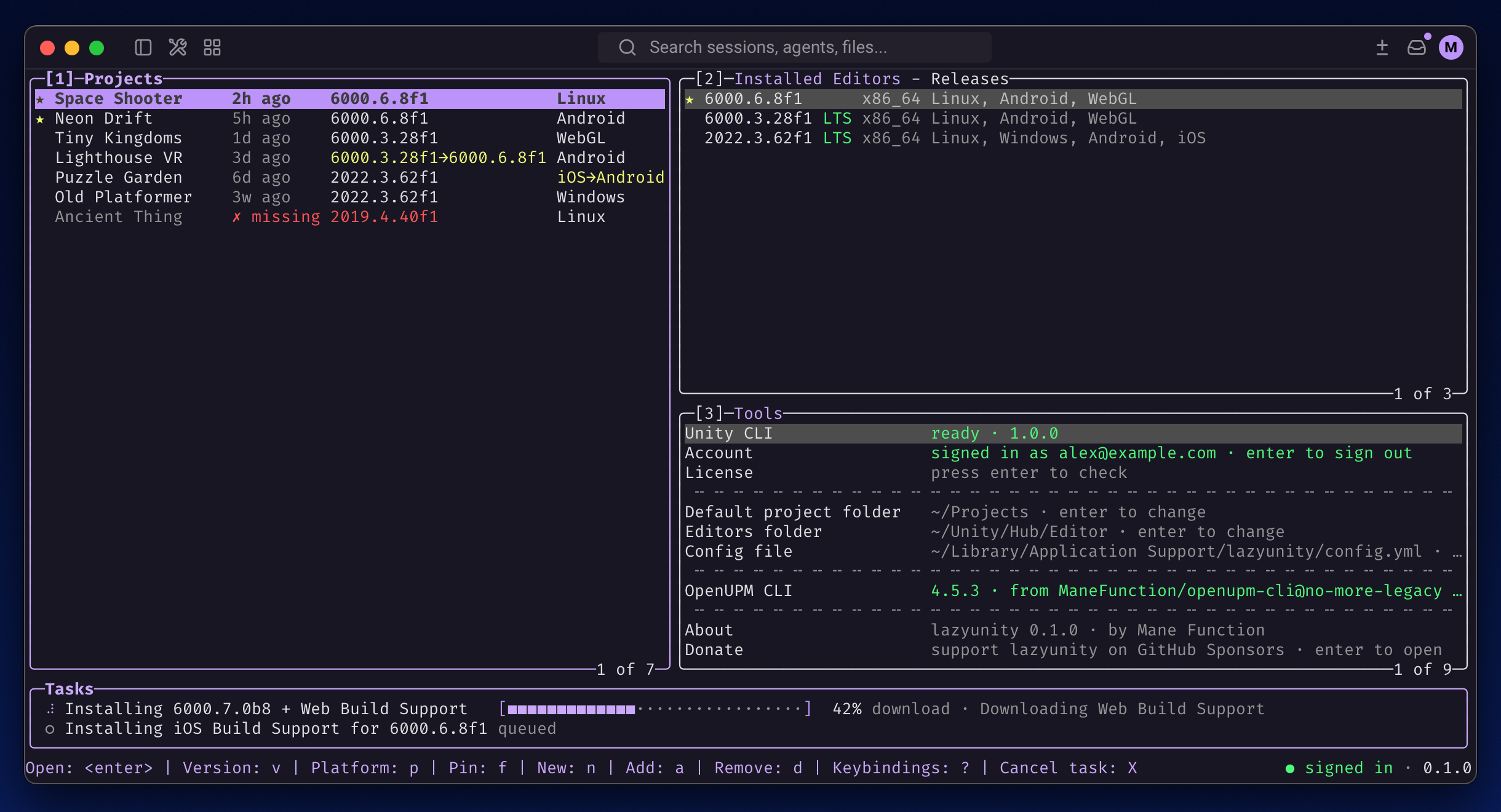
Text version of UI
╭─[1]─Projects────────────────────────────────────────────────╮╭─[2]─Installed Editors - Releases────────────────────────────────────────────╮
│★ Space Shooter  2h ago    6000.6.8f1             Linux      ││★ 6000.6.8f1      x86_64 Linux, Android, WebGL                               │
│★ Neon Drift     5h ago    6000.6.8f1             Android    ││  6000.3.28f1 LTS x86_64 Linux, Android, WebGL                               │
│  Tiny Kingdoms  1d ago    6000.3.28f1            WebGL      ││  2022.3.62f1 LTS x86_64 Linux, Windows, Android, iOS                        │
│  Lighthouse VR  3d ago    6000.3.28f1→6000.6.8f1 Android    │╰──────────────────────────────────────────────────────────────────────1 of 3─╯
│  Puzzle Garden  6d ago    2022.3.62f1            iOS→Android│╭─[3]─Tools───────────────────────────────────────────────────────────────────╮
│  Old Platformer 3w ago    2022.3.62f1            Windows    ││Unity CLI                ready · 1.0.0                                       │
│  Ancient Thing  ✗ missing 2019.4.40f1            Linux      ││Account                  signed in as alex@example.com · enter to sign out   │
│                                                             ││License                  press enter to check                                │
│                                                             ││ ╌ ╌ ╌ ╌ ╌ ╌ ╌ ╌ ╌ ╌ ╌ ╌ ╌ ╌ ╌ ╌ ╌ ╌ ╌ ╌ ╌ ╌ ╌ ╌ ╌ ╌ ╌ ╌ ╌ ╌ ╌ ╌ ╌ ╌ ╌ ╌ ╌ ╌ │
│                                                             ││Default project folder   ~/Projects · enter to change                        │
│                                                             ││Editors folder           ~/Unity/Hub/Editor · enter to change                │
│                                                             ││Config file              ~/.config/lazyunity/config.yml · enter to edit      │
│                                                             ││ ╌ ╌ ╌ ╌ ╌ ╌ ╌ ╌ ╌ ╌ ╌ ╌ ╌ ╌ ╌ ╌ ╌ ╌ ╌ ╌ ╌ ╌ ╌ ╌ ╌ ╌ ╌ ╌ ╌ ╌ ╌ ╌ ╌ ╌ ╌ ╌ ╌ ╌ │
│                                                             ││OpenUPM CLI              4.5.3 · from ManeFunction/openupm-cli@no-more-legacy│
│                                                             ││ ╌ ╌ ╌ ╌ ╌ ╌ ╌ ╌ ╌ ╌ ╌ ╌ ╌ ╌ ╌ ╌ ╌ ╌ ╌ ╌ ╌ ╌ ╌ ╌ ╌ ╌ ╌ ╌ ╌ ╌ ╌ ╌ ╌ ╌ ╌ ╌ ╌ ╌ │
│                                                             ││About                    lazyunity 0.1.0 · by Mane Function                  │
│                                                             ││Donate                   support lazyunity on GitHub Sponsors · enter to open│
╰──────────────────────────────────────────────────────1 of 7─╯╰──────────────────────────────────────────────────────────────────────1 of 9─╯
╭─Tasks──────────────────────────────────────────────────────────────────────────────────────────────────────────────────────────────────────╮
│ ⠙ Installing 6000.7.0b8 + Web Build Support   [■■■■■■■■■■■■················]  42% download · Downloading Web Build Support                 │
│ ○ Installing iOS Build Support for 6000.6.8f1 queued                                                                                       │
╰────────────────────────────────────────────────────────────────────────────────────────────────────────────────────────────────────────────╯
Open: <enter> | Version: v | Platform: p | Pin: f | New: n | Add: a | Remove: d | Keybindings: ? | Cancel task: X          ● signed in · 0.1.0
If anything breaks after a Unity CLI update, start lazyunity in safe mode (lazyunity --safe) to roll the Unity CLI back to a supported version.
- The Unity CLI, version 1.0.0 or newer. If it is missing, lazyunity offers to install it with Unity's official installer (Tools tab,
[3]). docs/UnityCLI.md lists every CLI command, flag and output field lazyunity relies on, and the CLI version they were checked against. - Linux, macOS or Windows. A terminal with colours and, ideally, mouse support.
lazyunity is available from a variety of sources.
brew, scoop or winget is recommended, because they have a convenient way to manage updates automatically.
- brew (Recommended for Mac and Linux users)
- Type
brew tap manefunction/tapin your Terminal to add my custom tap (app source) to your brew sources, if you haven't already. - Type
brew install lazyunityto install the application itself. - Verify the installation with
lazyunity --version. - You are perfect, you can use the app with
lazyunityfrom any folder in your system.
- Type
- Scoop (Recommended for Windows users)
- If you don't have Scoop yet, install it as scoop.sh shows: one line in PowerShell.
- Type
scoop bucket add manefunction https://github.com/ManeFunction/scoop-bucketin PowerShell to add my bucket (app source) to your Scoop sources, if you haven't already. - Type
scoop install lazyunityto install the application itself. - Verify the installation with
lazyunity --version. - You are perfect, you can use the app with
lazyunityfrom any folder in your system.
- WinGet (built into Windows 10 and 11)
- Type
winget install ManeFunction.lazyunityin PowerShell or cmd. A new package waits for Microsoft's review before it shows up in WinGet, so the newest version can be a few days behind the other options. - Verify the installation with
lazyunity --versionin a new terminal window. - You are perfect, you can use the app with
lazyunityfrom any folder in your system. - Update it with
winget upgrade ManeFunction.lazyunity.
- Type
- go install (for Go developers)
- Type
go install github.com/ManeFunction/lazyunity/cmd/lazyunity@latest. It needs Go 1.27.3 or newer and puts the app into$(go env GOPATH)/bin, which should be on yourPATH. - Verify the installation with
lazyunity --version.
- Type
- Ready-to-use binaries (manual installation)
- Download the archive for your system from the GitHub Releases
page:
darwinis macOS,arm64is Apple Silicon and Windows on ARM,amd64is Intel and AMD. - Unpack it and put
lazyunity(lazyunity.exeon Windows) into a folder on yourPATH. - The binaries are not code-signed. On macOS a downloaded binary is blocked until you run
xattr -d com.apple.quarantine lazyunityonce. - Verify the installation with
lazyunity --version.
- Download the archive for your system from the GitHub Releases
page:
- From source (for advanced users)
- Clone the repository or download the source code from GitHub.
- Go to the folder with the code in your Terminal and run
make build(Go 1.27.3 or newer). - Run
bin/lazyunity --versionto verify the build.
| Panel | What it shows |
|---|---|
| [1] Projects | Your projects with the last time each was opened, its Unity version and its build platform. |
| [2] Editors | Installed Editors with their platforms, and Releases you can install. enter on an Editor shows its modules. |
| [3] Options | Tools, in groups: the Unity CLI, your account and the license; the default project folder, the editors folder and the config file; the OpenUPM CLI; About and Donate. |
| Tasks (bottom) | A progress frame that appears only while something is installing, then goes away. Tasks run one at a time; the same Editor or module cannot be queued twice. |
+ and _ switch the screen mode: full (every panel), projects (only Projects) and editors (Editors and Options). Jumping to a panel that is not on screen (1, 2, 3) switches to the mode that shows it.
Changing a project's Unity version or platform is remembered and applied the next time you open it. A pending change is shown in yellow, as 6000.6.8f1→2022.3.62f1 or Linux→Android.
Everything follows lazygit where lazygit has an equivalent. ? shows the keys that apply right now, and filters as you type. Keys can be changed in config.yml.
Everywhere
| Key | |
|---|---|
? |
keybindings menu |
q, ctrl+c |
quit |
tab, l, → / shift+tab, h, ← |
next / previous panel |
1 2 3 |
jump to a panel (again: next tab) |
[ ] |
previous / next tab |
j k, ↓ ↑ |
next / previous item |
, . (or pgup pgdn) |
previous / next page |
< > (or home end) |
top / bottom |
/ |
filter the list; esc clears it |
+ _ |
next / previous screen mode (full, projects, editors) |
R |
refresh |
@ |
command log |
: |
run a shell command |
ctrl+o |
copy the selected path |
X |
cancel the running task |
ctrl+z |
suspend to the shell (not on Windows) |
esc |
clear a filter, or leave an Editor's modules |
Projects
| Key | |
|---|---|
enter, space |
open in Unity, signed in |
v |
change the Unity version (a list of installed Editors) |
p |
change the build platform (the platforms installed for that Editor) |
f |
pin or unpin |
n |
new project (name, folder, version, template, options) |
a |
add an existing project |
ctrl+a |
add an OpenUPM package to the project (needs the OpenUPM CLI) |
d |
remove from the list, or delete the folder (asks twice) |
s |
sort: last opened, name, Unity version |
o / e |
open the folder / edit in a code editor |
i |
project details |
y |
copy the path, name or version |
C |
clean caches (Library, Temp ...) |
Editors, Installed Editors
| Key | |
|---|---|
enter |
modules |
a |
add modules |
n |
install a new Editor |
d |
uninstall |
space |
set default |
u |
update to the newest patch, when one is out (the row says "· update X available ·") |
o |
folder |
y |
copy |
Modules of an Editor
| Key | |
|---|---|
space, a, enter |
install |
d |
remove |
Releases
| Key | |
|---|---|
enter, space |
install |
/ |
filter by version, in the filter row at the bottom of the tab (every page of releases is searched, not only the ones loaded) |
ctrl+s |
release stream: Supported (the default), LTS, Beta, Alpha or All |
o |
release notes |
Anywhere in the Editors panel: C cleans the download cache, where installers and the partial downloads of interrupted installs are kept (asks first, with its size; not while a task runs).
config.yml lives in ~/.config/lazyunity/ (~/Library/Application Support/lazyunity/ on macOS, %LOCALAPPDATA%\lazyunity\ on Windows, as with lazygit), or wherever --config-dir or $LAZYUNITY_CONFIG_DIR points. A set $XDG_CONFIG_HOME puts it in $XDG_CONFIG_HOME/lazyunity/ on every system. lazyunity only reads it. What the interface remembers (pending choices, sort order) goes in state.yml next to it. The first time you edit it from the Tools tab, lazyunity writes every setting into it, commented out and set to its default, keybindings included.
gui:
  border: rounded            # rounded, single, double, bold, hidden
  sidePanelWidth: 0.45
  mouseEvents: true
  showPanelJumps: true
  showListFooter: true       # "1 of 20" on a list's bottom border
  screenMode: full           # full, projects, editors
  portraitMode: auto         # one column of panels: auto, always, never
  portraitModeAutoMaxWidth: 84   # auto: when the window is at most this wide
  portraitModeAutoMinHeight: 46  # and at least this tall
  theme:                     # a colour and modifiers: [brightblue, bold], '#5c9dff', ...
    activeBorderColor: [brightblue, bold]
    selectedLineBgColor: [blue]
keybinding:                  # lazygit's notation works: <c-s>, <space>, <enter>
  universal:
    quit: [q, <c-c>]
    refresh: <disabled>
  projects:
    open: [<enter>, O]
os:
  edit: code {{dir}}         # for `e`; default is $VISUAL / $EDITOR
  openFolder: ''             # default is xdg-open, open or explorer
  shell: ''                  # for `:`; default is $SHELL, or cmd on Windows (pwsh works too)
unity:
  cliPath: ''                # default: found automatically
projects:
  defaultLocation: ~/Projects
quitAfterOpen: false
Command lines (os.edit, os.openFolder, $VISUAL / $EDITOR) are cut into words as a shell would, with quotes grouping words, but nothing in them is expanded. On Windows a backslash is part of the path, so C:\Tools\nvim.exe {{dir}} works as written; on Unix it escapes the next character.
lazyunity can add OpenUPM packages to your projects through openupm-cli.
- Installing the CLI. The OpenUPM CLI row of the Tools tab installs it with npm (Node.js is needed). By default that is the official release from the npm registry. With
openupm.reposet inconfig.yml, that repository (the official one or a fork) is cloned and built instead, and git is needed too. - Updates. Like the Unity CLI row, the row says
ready · <version>for the npm release andupdate available: <version>once a newer one is out. A build from a repository reads<version> · from <repo>@<branch> #<commit>, and the row offers an update whenever the branch has newer commits, even when the version did not change. - Adding a package.
ctrl+ain Projects asks for a package name, such ascom.example.packageorcom.example.package@1.2.0, and adds it to the selected project. - New projects. With the CLI installed, the last step of
n(new project) can add ManeTools from OpenUPM, in full or without the UI module, before the Editor opens.
Where the CLI comes from is set by the openupm block of config.yml:
# openupm:                   # commented out: the Tools tab installs the official npm release
#   repo: https://github.com/ManeFunction/openupm-cli   # set: clone, build and install from this git repo
#   ref: no-more-legacy      # a branch or tag to build; empty: the default branch
OpenUPM CLI fork. Until openupm/openupm-cli#430 is merged (it is not accepted yet), the fork in the block above is the recommended build. It drops deprecated dependencies, so npm no longer floods the install with deprecation warnings. It also cuts the npm audit findings from 19 vulnerable production packages (one critical) to 5, and fixes openupm login with a username and password, which sent the email as the password and logged in to registry.npmjs.org instead of the registry you asked for. It needs Node.js 20.17+ or 22.9+. Uncomment the block to use it; leave it commented out for the official npm release.
- Nothing is installed, removed or deleted without a question first. Deleting a project's folder asks twice and refuses anything that is not a Unity project, or the home folder.
- Quitting during a task asks first.
- lazyunity never writes the Hub's files itself. It asks the CLI.
- Opening an Editor that is older than 2019.1, or opening without the CLI, launches it directly. That works, but the Editor starts signed out.
- A project moving to Unity 6.7 or later is upgraded with
unity projects upgrade, sinceunity openrefuses to do that.
Thanks to the whole lazygit team for the inspiration and for a great Git client 🤎
lazyunity is made by Ilia Petrov-Komotskii (Mane Function). If it saves you time, you can support it on GitHub Sponsors.
This repo follows the Conventional Commits specification.


